More and more customers ask AI tools such as ChatGPT, Gemini, Claude and Perplexity where to get something printed and what it costs. These tools, like search engines, can only use prices they can read. On a wp2print product page the price is calculated in the browser after the customer chooses options, so an AI tool that reads the page sees no prices at all.
The AI integration tab solves this. wp2print creates a price list page for each product, written in plain text and tables that AI tools and search engines can read, and tells them where to find these pages.
This tab is found at wp2print > Settings > AI integration. It was added in wp2print 4.0.1.
Two more pages explain AI integration: How AI tools use your prices describes what data AI tools actually use when customers ask about prices, and Pages for AI tools shows examples of the price list pages, JSON price data and llms.txt.
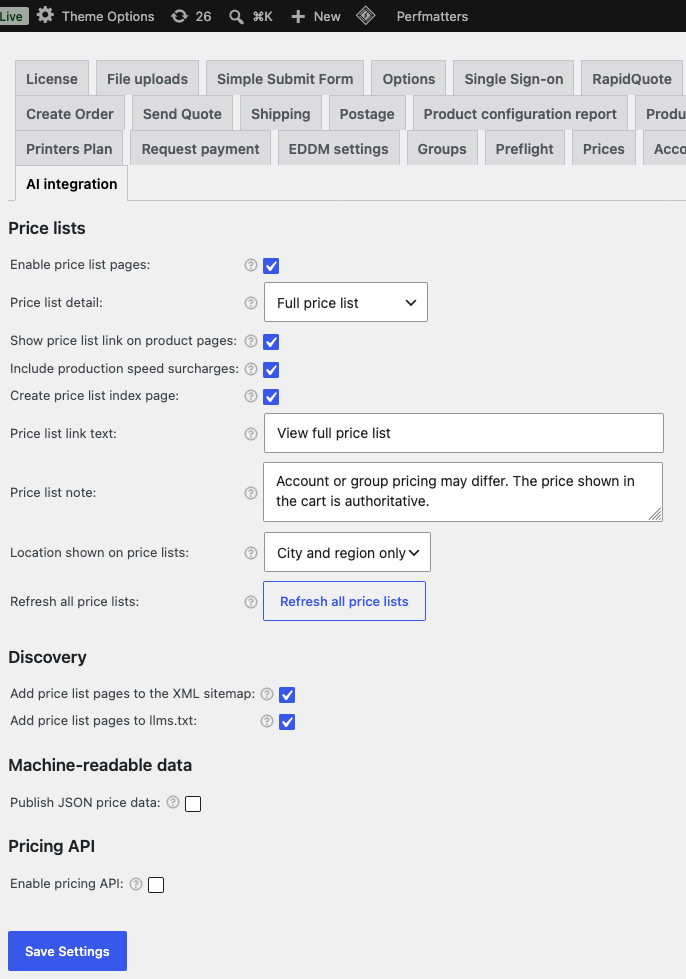
¶ Price list pages
When Enable price list pages is checked, each product gets a price list page at the address of the product followed by prices/. For example, the price list of https://wp2print.net/shop/leaflets/ is at https://wp2print.net/shop/leaflets/prices/.
A full price list page contains:
- The name of your company and its location.
- A note that prices are in your store currency, excluding tax and shipping, with a link to the product page.
- How the price is calculated: the rule for working out the price of any quantity, including the minimum quantity, the minimum order amount and the production speed surcharges.
- A worked example that shows the rule applied to one configuration.
- The price tables of the product: printing prices, finishing prices and add-ons for every option and quantity. Combinations that cannot be ordered are marked N/A, and combinations blocked by attribute exclusions are listed below the tables.
- The production speed surcharges.
- The price list note (see below).
Here is the full price list of the Leaflets product on the wp2print demo site:
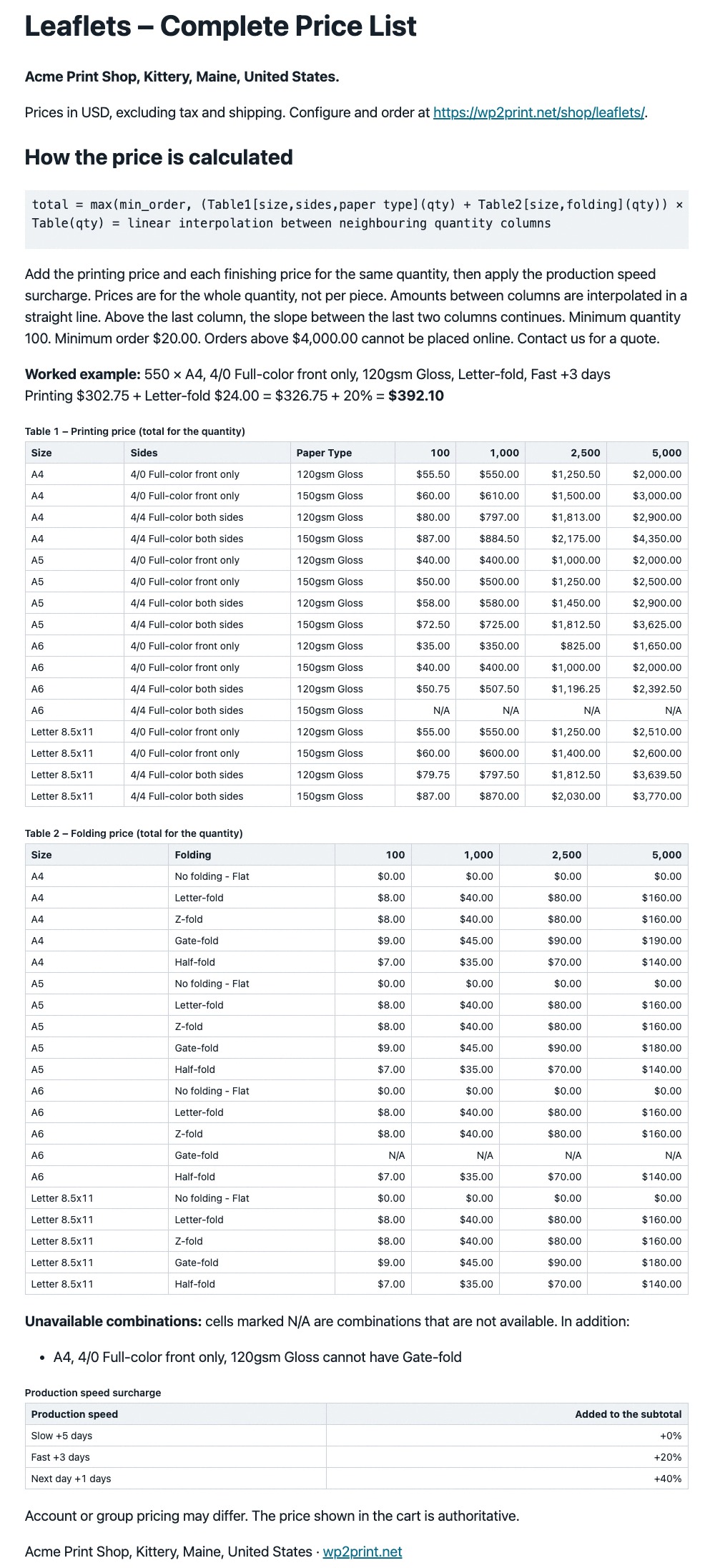
The page is built from the current prices of the product every time it is requested, so it always matches the product page. It also contains structured data (a schema.org Product with an AggregateOffer) that search engines read.
¶ Which products get a price list page
Price list pages are created for fixed size, area and book products. A product does not get a price list page, and is also left out of llms.txt and the sitemap, when:
- the product is not published, or is password protected
- the product is assigned to a group, directly or through a group category
- Hide prices for users that are not logged-in is checked on the product
- Exclude from price list is checked on the product
- wp2print cannot find a printing price for the product, for example because no prices have been entered yet
The price list address of these products shows a normal Page not found error, for every visitor.
¶ Full price list or starting prices only
Price list detail sets what the price list pages show:
- Full price list: every option and quantity with its price, the rule for working out any total and a worked example.
- Starting prices only: the lowest price at each quantity and a list of the available options, without the full price tables. Use this when you do not want competitors to copy your complete pricing. AI tools can still give customers a starting price and send them to the product page for an exact price.
A starting prices page shows the lowest price at each quantity, the quantities that can be ordered and the available options, including the production speed surcharges. Here is the starting prices page of the Business card product on the wp2print demo site:
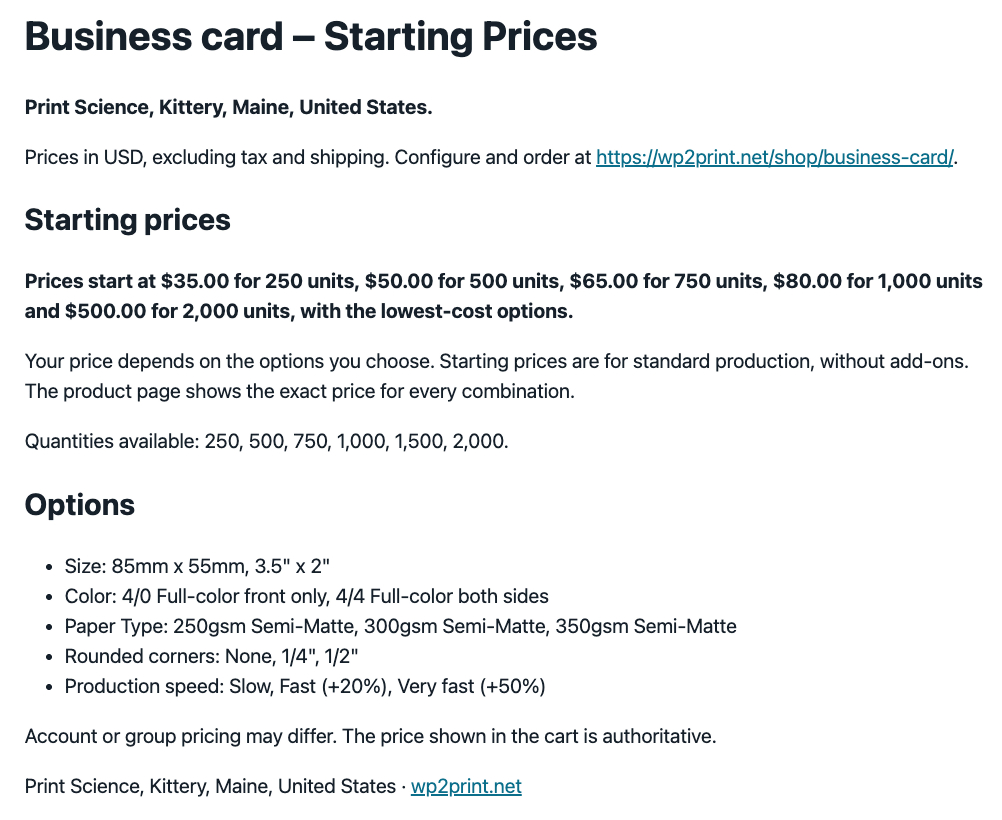
To see both live, compare Leaflets (full price list) with Business card (starting prices only).
¶ Settings on each product
Two settings on the Prices tab of each product, below Hide prices for users that are not logged-in, change the price list of that product:
- Exclude from price list: leaves the product out of the price list pages and llms.txt. The product page itself is not affected.
- Price list detail: Use store setting follows the setting on this tab. Choose Full price list or Starting prices only to use a different setting for this product.
¶ Price list settings
| Setting | What it does |
|---|---|
| Enable price list pages | Creates the price list pages. All other settings on this tab apply only when this is checked. |
| Price list detail | Full price list or Starting prices only, for all products. Each product can override it (see above). |
| Show price list link on product pages | Adds a link to the price list page on each product page, next to the price. Search engines and AI tools find the price list pages by following this link. |
| Include production speed surcharges | Adds the production speed surcharges to the price list pages and includes them in the price rule. Uncheck if your store does not offer production speed options. |
| Create price list index page | Not active yet. Reserved for a single page that links to all price lists, planned for a later version of wp2print. |
| Price list link text | Text of the link on product pages. Leave blank to use the default text, View full price list. When a product shows starting prices only, the default text changes to View starting prices. |
| Price list note | Note at the bottom of every price list page. The default note is Account or group pricing may differ. The price shown in the cart is authoritative. Leave blank to use the default note. |
| Location shown on price lists | City and region only, Full address or None. Sets how much of your address is shown on price list pages and in llms.txt. City and region helps customers and AI tools find a printer nearby without publishing your street address. Choose None for an online-only store. |
| Refresh all price lists | Clears all price list pages from the page cache (for example LiteSpeed Cache or WP Rocket). See below. |
The company name, address, phone and catchment area shown on price list pages come from the Search Engine integration tab. When that tab has no address, wp2print uses the store address in WooCommerce > Settings > General.
¶ Price lists and page caching
When you save a product, wp2print clears the price list page of that product from the page cache, so the next visitor sees the new prices. This works with LiteSpeed Cache, W3 Total Cache, WP Rocket, SiteGround Optimizer and WP Super Cache. If prices are changed in another way, for example directly in the database or by an import, click Refresh all price lists. The button is available after Enable price list pages has been checked and saved.
¶ Discovery
These settings tell search engines and AI tools where the price list pages are.
¶ Add price list pages to the XML sitemap
Adds the price list pages to the XML sitemap of your site, so search engines find them quickly. This works with the sitemap built into WordPress and with the Yoast SEO and Rank Math sitemaps. wp2print also adds the price list sitemap to robots.txt.
The sitemap is only created when search engines are allowed to index the site, that is when Discourage search engines from indexing this site is not checked in Settings > Reading.
¶ Add price list pages to llms.txt
llms.txt is a text file in the root folder of a website that tells AI tools what the site is about and where to find its most useful information. When this is checked, wp2print generates llms.txt for your site automatically. It contains your company name and location, an explanation of the price list pages, and a link to the product page and price list page of each product. When Publish JSON price data is checked, it also links to the JSON price data of each product. See the llms.txt of the demo site for an example: https://wp2print.net/llms.txt.
If your site already has an llms.txt file in its root folder, that file is used instead and wp2print does not generate one. The tab then shows an Existing llms.txt file row with two buttons:
- View file shows the text of the existing file.
- Delete file removes the file, so that wp2print generates llms.txt instead. Copy the text first if you may need it later. If WordPress is not allowed to delete the file, delete it with FTP or with the file manager of your hosting account.
¶ Machine-readable data
When Publish JSON price data is checked, wp2print publishes the prices of each product as a JSON file at the address of the product followed by prices.json. For example, the JSON price data of https://wp2print.net/shop/leaflets/ is at https://wp2print.net/shop/leaflets/prices.json.
JSON is a data format that software reads directly, so chatbots, partner systems and AI agents can calculate your prices without reading the price list page. The JSON file contains the same prices as the price list page and is updated at the same moment. wp2print also links to it in llms.txt and from the price list page. Search engines are asked not to index these files.
The JSON file is published for the same products as the price list pages. For products set to Starting prices only, it contains only the starting prices and the available options, not the full price tables.
¶ What the JSON file contains
product,urlandprice_page: the product name, the product page and the price list page.currency,prices_include_taxandupdated: the store currency, whether prices include tax, and the date the product was last changed.product_typeanddetail: fixed, area or book, andfullorstarting_prices.rules: theformulathat works out the total, what each measure in the formula means (measures), how to read prices between and above the columns, the minimum quantity and the minimum and maximum order.options: the options a customer can choose. Each option is named after the attribute label of the product, for examplepaper_typefor Paper Type.tables: the price tables. Each table says what it is priced by (priced_by: quantity, area, perimeter, pages or books), itscolumns, and itsrows. Each price in a row belongs to the column in the same position.unavailable: combinations of options that cannot be ordered.speedandaddons: the production speed surcharges in percent, and the add-on items with their price per item.example: a worked example with the price from each table, so software can check that it applies the formula correctly. It is the same example as on the price list page.noteandseller: the price list note, and your company name and location.
Area products also contain the available dimensions and common sizes. Book products price pages by the number of pages of each page type, and covers and binding by the number of books.
¶ Example
Here is the JSON price data of the Leaflets product on the wp2print demo site. To price an order, find the row of each table that matches the chosen options and read the price at the quantity. For example, 1,500 leaflets is between the 1,000 and 2,500 columns, so the printing price of A5, 4/4 Full-color both sides, 150gsm Gloss is $725.00 + ($1,812.50 − $725.00) × 500 / 1,500 = $1,087.50. The Z-fold price is worked out the same way ($53.33), and the Fast surcharge of 20% gives a total of $1,369.00.
{
  "product": "Leaflets",
  "url": "https://wp2print.net/shop/leaflets/",
  "price_page": "https://wp2print.net/shop/leaflets/prices/",
  "currency": "USD",
  "prices_include_tax": false,
  "updated": "2026-10-27",
  "product_type": "fixed",
  "detail": "full",
  "rules": {
    "formula": "total = max(min_order, (printing[size,sides,paper_type](qty) + folding[size,folding](qty)) × (1 + speed%))",
    "measures": {"qty": "number of pieces"},
    "price_basis": "each price is the total for the number in its column, not a unit price",
    "lookup": "table[keys](measure) = the row whose keys match the chosen options, at the value of the measure",
    "interpolation": "linear",
    "above_max_column": "extrapolate_last_slope",
    "below_min_column": "proportional_to_first_column",
    "speed": "speed% is the percent of the chosen production speed",
    "min_quantity": 100,
    "min_order": 20,
    "max_order": 4000,
    "above_max_order": "cannot be ordered online, contact the store for a quote",
    "unavailable": "a configuration matching every field of any entry in unavailable cannot be ordered"
  },
  "options": {
    "size": ["A4", "A5", "A6", "Letter 8.5x11"],
    "sides": ["4/0 Full-color front only", "4/4 Full-color both sides"],
    "paper_type": ["120gsm Gloss", "150gsm Gloss"],
    "folding": ["No folding - Flat", "Letter-fold", "Z-fold", "Gate-fold", "Half-fold"],
    "speed": ["Slow +5 days", "Fast +3 days", "Next day +1 days"]
  },
  "tables": {
    "printing": {
      "price_of": "printing",
      "priced_by": "qty",
      "columns": [100, 1000, 2500, 5000],
      "keys": ["size", "sides", "paper_type"],
      "rows": [
        {"size": "A4", "sides": "4/0 Full-color front only", "paper_type": "120gsm Gloss", "prices": [55.5, 550, 1250.5, 2000]},
        {"size": "A4", "sides": "4/0 Full-color front only", "paper_type": "150gsm Gloss", "prices": [60, 610, 1500, 3000]},
        {"size": "A4", "sides": "4/4 Full-color both sides", "paper_type": "120gsm Gloss", "prices": [80, 797, 1813, 2900]},
        {"size": "A4", "sides": "4/4 Full-color both sides", "paper_type": "150gsm Gloss", "prices": [87, 884.5, 2175, 4350]},
        {"size": "A5", "sides": "4/0 Full-color front only", "paper_type": "120gsm Gloss", "prices": [40, 400, 1000, 2000]},
        {"size": "A5", "sides": "4/0 Full-color front only", "paper_type": "150gsm Gloss", "prices": [50, 500, 1250, 2500]},
        {"size": "A5", "sides": "4/4 Full-color both sides", "paper_type": "120gsm Gloss", "prices": [58, 580, 1450, 2900]},
        {"size": "A5", "sides": "4/4 Full-color both sides", "paper_type": "150gsm Gloss", "prices": [72.5, 725, 1812.5, 3625]},
        {"size": "A6", "sides": "4/0 Full-color front only", "paper_type": "120gsm Gloss", "prices": [35, 350, 825, 1650]},
        {"size": "A6", "sides": "4/0 Full-color front only", "paper_type": "150gsm Gloss", "prices": [40, 400, 1000, 2000]},
        {"size": "A6", "sides": "4/4 Full-color both sides", "paper_type": "120gsm Gloss", "prices": [50.75, 507.5, 1196.25, 2392.5]},
        {"size": "Letter 8.5x11", "sides": "4/0 Full-color front only", "paper_type": "120gsm Gloss", "prices": [55, 550, 1250, 2510]},
        {"size": "Letter 8.5x11", "sides": "4/0 Full-color front only", "paper_type": "150gsm Gloss", "prices": [60, 600, 1400, 2600]},
        {
          "size": "Letter 8.5x11",
          "sides": "4/4 Full-color both sides",
          "paper_type": "120gsm Gloss",
          "prices": [79.75, 797.5, 1812.5, 3639.5]
        },
        {"size": "Letter 8.5x11", "sides": "4/4 Full-color both sides", "paper_type": "150gsm Gloss", "prices": [87, 870, 2030, 3770]}
      ]
    },
    "folding": {
      "price_of": "Folding",
      "priced_by": "qty",
      "columns": [100, 1000, 2500, 5000],
      "keys": ["size", "folding"],
      "rows": [
        {"size": "A4", "folding": "No folding - Flat", "prices": [0, 0, 0, 0]},
        {"size": "A4", "folding": "Letter-fold", "prices": [8, 40, 80, 160]},
        {"size": "A4", "folding": "Z-fold", "prices": [8, 40, 80, 160]},
        {"size": "A4", "folding": "Gate-fold", "prices": [9, 45, 90, 190]},
        {"size": "A4", "folding": "Half-fold", "prices": [7, 35, 70, 140]},
        {"size": "A5", "folding": "No folding - Flat", "prices": [0, 0, 0, 0]},
        {"size": "A5", "folding": "Letter-fold", "prices": [8, 40, 80, 160]},
        {"size": "A5", "folding": "Z-fold", "prices": [8, 40, 80, 160]},
        {"size": "A5", "folding": "Gate-fold", "prices": [9, 45, 90, 180]},
        {"size": "A5", "folding": "Half-fold", "prices": [7, 35, 70, 140]},
        {"size": "A6", "folding": "No folding - Flat", "prices": [0, 0, 0, 0]},
        {"size": "A6", "folding": "Letter-fold", "prices": [8, 40, 80, 160]},
        {"size": "A6", "folding": "Z-fold", "prices": [8, 40, 80, 160]},
        {"size": "A6", "folding": "Half-fold", "prices": [7, 35, 70, 140]},
        {"size": "Letter 8.5x11", "folding": "No folding - Flat", "prices": [0, 0, 0, 0]},
        {"size": "Letter 8.5x11", "folding": "Letter-fold", "prices": [8, 40, 80, 160]},
        {"size": "Letter 8.5x11", "folding": "Z-fold", "prices": [8, 40, 80, 160]},
        {"size": "Letter 8.5x11", "folding": "Gate-fold", "prices": [9, 45, 90, 180]},
        {"size": "Letter 8.5x11", "folding": "Half-fold", "prices": [7, 35, 70, 140]}
      ]
    }
  },
  "unavailable": [
    {"size": "A6", "sides": "4/4 Full-color both sides", "paper_type": "150gsm Gloss"},
    {"size": "A6", "folding": "Gate-fold"},
    {"size": "A4", "sides": "4/0 Full-color front only", "paper_type": "120gsm Gloss", "folding": "Gate-fold"}
  ],
  "speed": [
    {"speed": "Slow +5 days", "percent": 0, "days": 5},
    {"speed": "Fast +3 days", "percent": 20, "days": 3},
    {"speed": "Next day +1 days", "percent": 40, "days": 1}
  ],
  "example": {
    "input": {
      "size": "A4",
      "sides": "4/0 Full-color front only",
      "paper_type": "120gsm Gloss",
      "folding": "Letter-fold",
      "qty": 550,
      "speed": "Fast +3 days"
    },
    "lines": [{"table": "printing", "qty": 550, "price": 302.75}, {"table": "folding", "qty": 550, "price": 24}],
    "subtotal": 326.75,
    "speed_percent": 20,
    "total": 392.1
  },
  "note": "Account or group pricing may differ. The price shown in the cart is authoritative.",
  "seller": {"name": "Acme Print Shop", "url": "https://wp2print.net/", "location": "Kittery, Maine, United States"}
}¶ Pricing API
Enable pricing API is not active yet. It is reserved for a feature planned for a later version of wp2print: an API, using the WordPress REST API, that returns the exact price of one product configuration, calculated the same way as on the product page. Leave it unchecked.
¶ Checking your price list pages
After you enable price list pages:
- Open a product page and click the price list link next to the price.
- Compare a few prices on the price list page with the prices shown on the product page for the same options and quantity.
- Open
/llms.txton your site and check that your products are listed.
If a product shows N/A or $0.00 for an option on its price list page, the same option shows no price on the product page. Check the prices entered for that product on its Prices tab.