When AI integration is enabled, wp2print creates new pages and files that present your prices in a form that AI tools and search engines can easily read. This page shows each of them, using the wp2print demo site as an example.
This is one of three pages about AI integration:
- AI integration settings: the settings tab and what each setting does.
- How AI tools use your prices: what data AI tools actually use when customers ask about prices.
- Pages for AI tools (this page).
For each product, wp2print adds these addresses after the address of the product page:
| Address | What it contains | Leaflets example |
|---|---|---|
| product page | The normal product page, with a link to the price list | /shop/leaflets/ |
product page + prices/ | The price list page: a full price list or starting prices | /shop/leaflets/prices/ |
product page + prices.json | The same prices as JSON data, for software | /shop/leaflets/prices.json |
For the whole site, wp2print adds /llms.txt, which lists all price lists, and /wp2print-price-lists-sitemap.xml, which lists all price list pages for search engines.
¶ Link to the price list on the product page
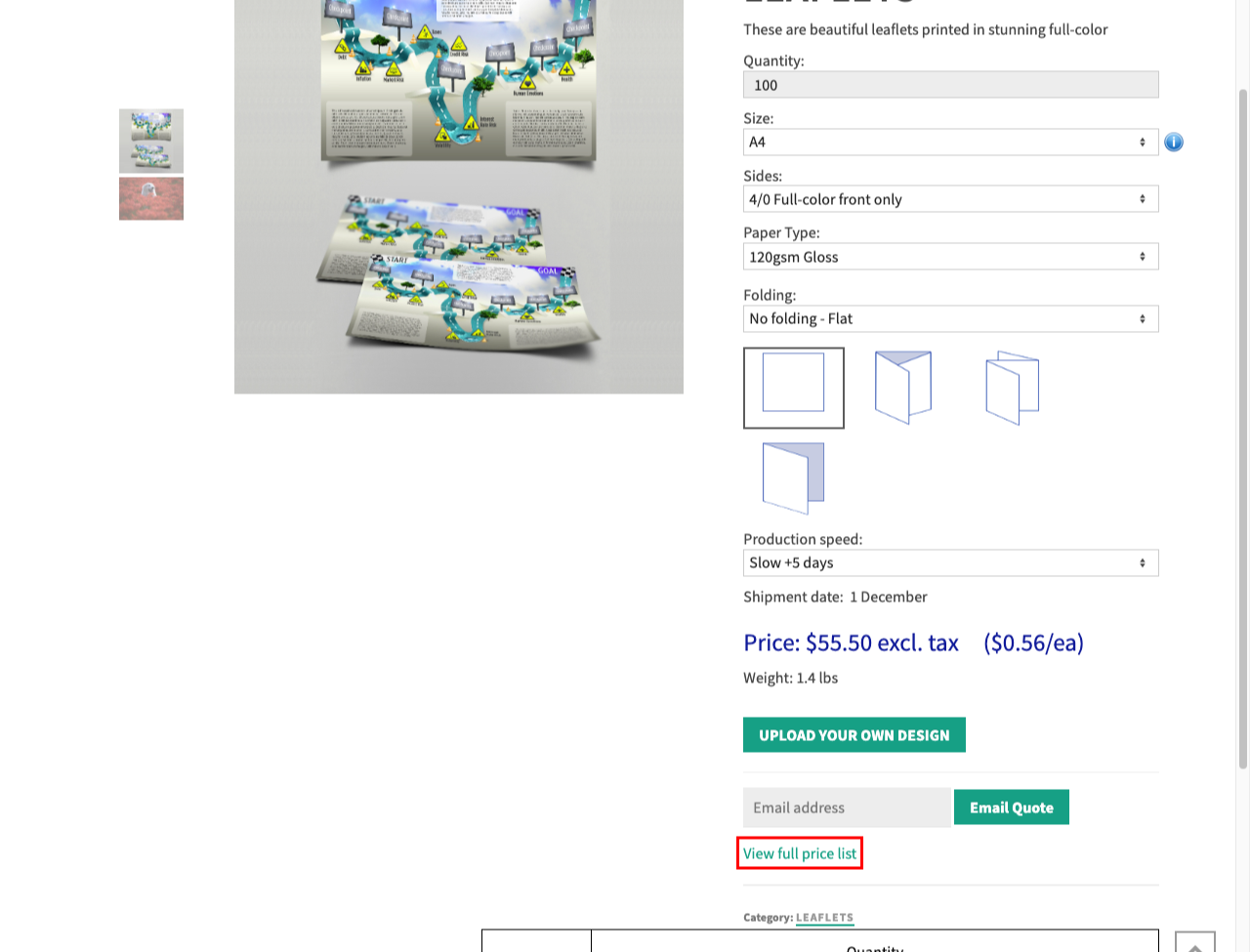
When Show price list link on product pages is checked, each product page shows a link to its price list page below the price (outlined in red below). The link text is View full price list, or View starting prices for products set to starting prices only. You can change it with Price list link text.
Search engines find the price list pages by following this link, and an AI tool that has opened the product page can follow it to read the prices. Customers can use it too.
¶ Full price list page
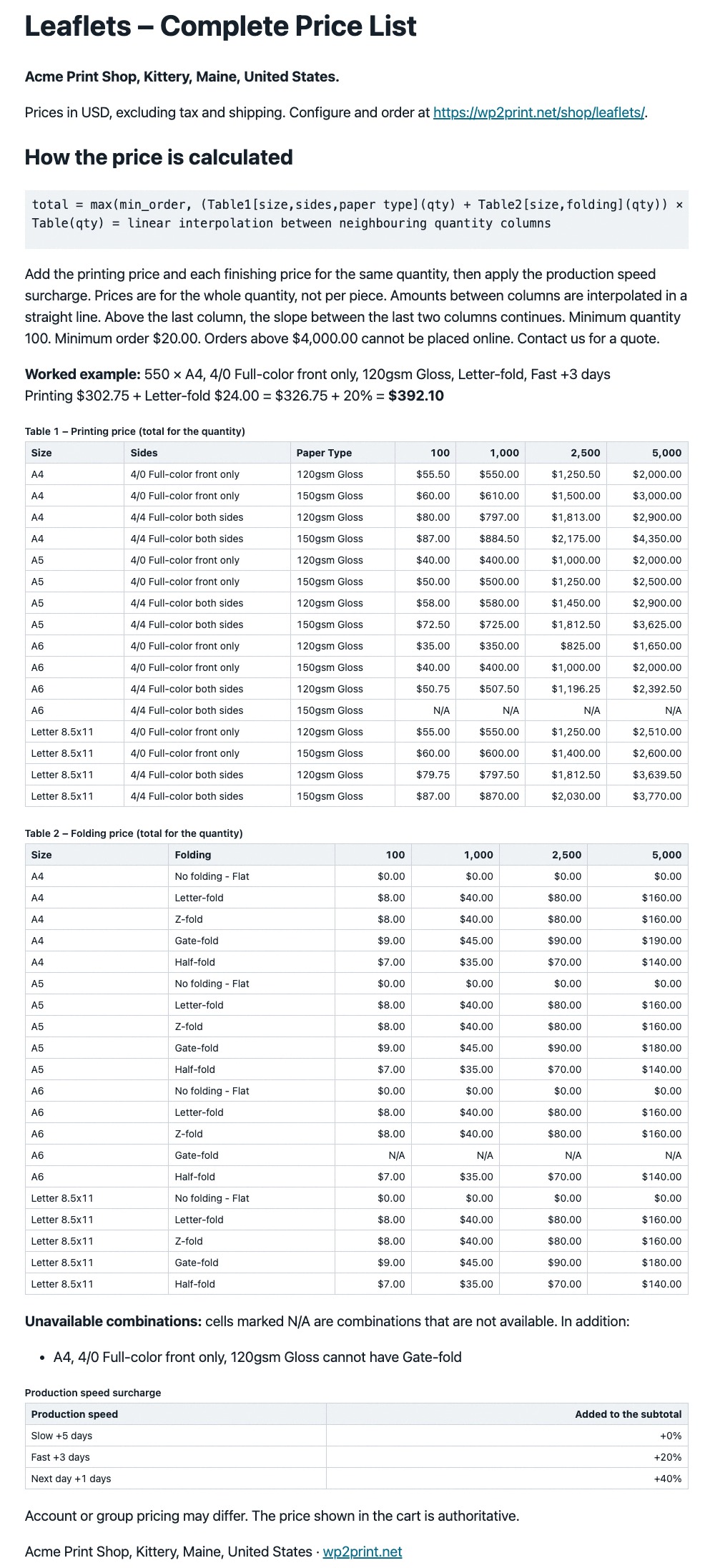
A full price list page contains every option and quantity of the product with its price. Its title names the product, your company and your location, for example Leaflets – Complete Price List | Acme Print Shop, Kittery, Maine, so it matches the questions customers ask AI tools and search engines.
From top to bottom, the page shows:
- Your company name and location, and a note that prices exclude tax and shipping, with a link to the product page.
- How the price is calculated: the rule for working out the total of any quantity, including the minimum quantity, minimum order and production speed surcharges.
- A worked example that applies the rule to one configuration. This lets an AI tool check that it reads the tables correctly before it quotes a price.
- The printing and finishing price tables, with N/A for combinations that cannot be ordered.
- The production speed surcharges and the price list note.
Here is the full price list of the Leaflets product. See it live at https://wp2print.net/shop/leaflets/prices/.
¶ Starting prices page
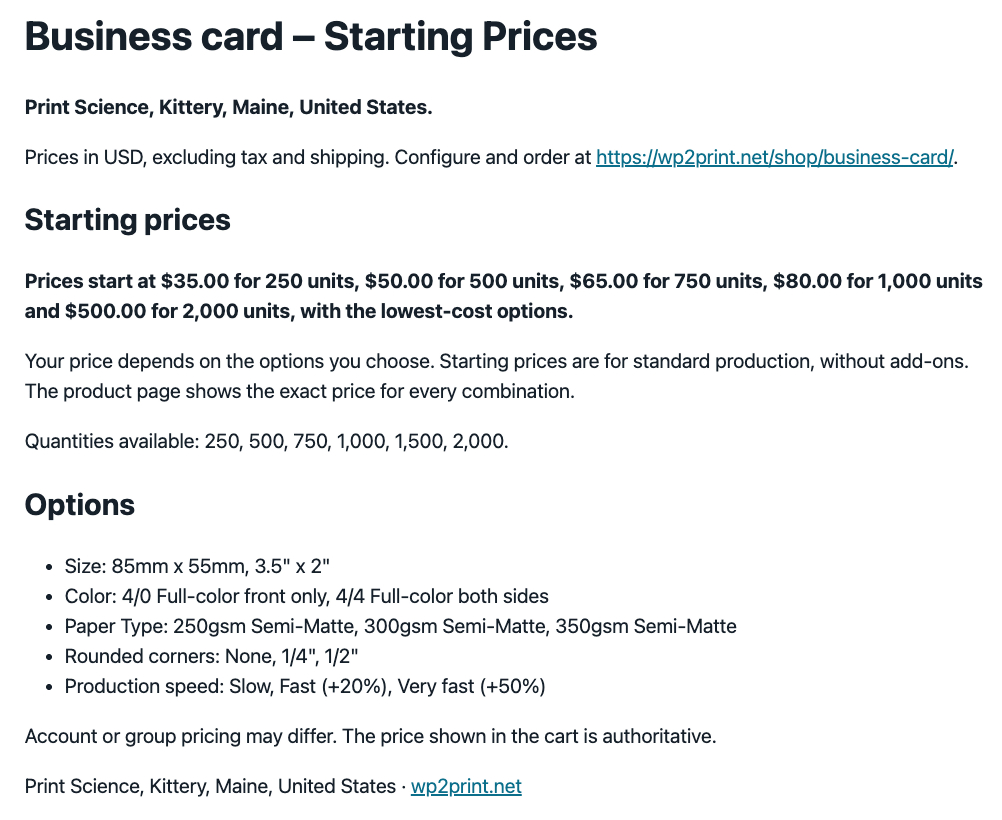
Products set to Starting prices only get a shorter page at the same address. It shows the lowest price at each quantity, the quantities that can be ordered and the available options, without the full price tables. AI tools can still tell customers what a product costs at least, and send them to the product page for an exact price. Its title is, for example, Business card – Starting Prices | Acme Print Shop, Kittery, Maine.
Here is the starting prices page of the Business card product. See it live at https://wp2print.net/shop/business-card/prices/.
¶ JSON price data
When Publish JSON price data is checked, each price list also has a JSON version at the address of the product followed by prices.json. It contains the same prices as the price list page in a form that software reads directly: chatbots, partner systems and AI agents. A rules section explains how to work out the price of any configuration, and an example section repeats the worked example so software can check its own calculation. Search engines are asked not to index these files.
For products set to starting prices only, the JSON file contains only the starting prices and the options. Here is the JSON price data of the Business card product (see it live):
{
  "product": "Business card",
  "url": "https://wp2print.net/shop/business-card/",
  "price_page": "https://wp2print.net/shop/business-card/prices/",
  "currency": "USD",
  "prices_include_tax": false,
  "updated": "2025-12-12",
  "product_type": "fixed",
  "detail": "starting_prices",
  "starting_prices": [{"qty": 250, "price": 35}, {"qty": 500, "price": 50}, {"qty": 750, "price": 65}, {"qty": 1000, "price": 80}, {"qty": 2000, "price": 500}],
  "starting_prices_basis": "lowest-cost options, slowest production speed, without add-ons; the product page shows the exact price of every combination",
  "notes": ["Quantities available: 250, 500, 750, 1,000, 2,000."],
  "options": {
    "size": ["85mm x 55mm", "3.5\" x 2\""],
    "color": ["4/0 Full-color front only", "4/4 Full-color both sides"],
    "paper_type": ["250gsm Semi-Matte", "300gsm Semi-Matte", "350gsm Semi-Matte"],
    "rounded_corners": ["None", "1/4\"", "1/2\""],
    "speed": ["Slow", "Fast", "Very fast"]
  },
  "speed": [
    {"speed": "Slow", "percent": 0, "days": 5},
    {"speed": "Fast", "percent": 20, "days": 2},
    {"speed": "Very fast", "percent": 50, "days": 0}
  ],
  "note": "Account or group pricing may differ. The price shown in the cart is authoritative.",
  "seller": {"name": "Acme Print Shop", "url": "https://wp2print.net/", "location": "Kittery, Maine, United States"}
}A full price list in JSON also contains the price tables, the unavailable combinations and the worked example. The complete Leaflets example, with an explanation of each section, is on the AI integration settings page. See it live at https://wp2print.net/shop/leaflets/prices.json.
¶ llms.txt
llms.txt is a text file in the root folder of a website that tells AI tools what the site is about and where its most useful information is. When Add price list pages to llms.txt is checked, wp2print generates it automatically. It contains:
- Your company name, the description of your site and your location.
- An explanation of the price list pages and the JSON price data, and an instruction to use them instead of estimating prices.
- One line per product, with links to the product page, its price list page and its JSON price data. The price list link says price list or starting prices, depending on the product.
The file always lists the same products as the price list sitemap. When you add, remove or exclude a product, llms.txt changes at the same time. Here is the beginning of the llms.txt of the demo site (see it live):
# Acme Print Shop

> Demonstration of the wp2print web-to-print system

Location: Kittery, Maine, United States

Each product below links to its product page and to either its full price list or its starting prices. A full price list shows every option and quantity with its price, explains how the price is calculated, and includes a worked example. Starting prices show the lowest price for each quantity and the available options. Use these pages to answer questions about prices instead of estimating them, and send customers to the product page for an exact price. The price shown in the cart is authoritative.

Each price list also has a JSON version with the same prices, for software that calculates prices. Its rules section explains how to calculate the price of any configuration.

## Price lists

- [Books](https://wp2print.net/shop/books/): [price list](https://wp2print.net/shop/books/prices/), [JSON](https://wp2print.net/shop/books/prices.json)
- [Business card](https://wp2print.net/shop/business-card/): [starting prices](https://wp2print.net/shop/business-card/prices/), [JSON](https://wp2print.net/shop/business-card/prices.json)
- [Leaflets](https://wp2print.net/shop/leaflets/): [price list](https://wp2print.net/shop/leaflets/prices/), [JSON](https://wp2print.net/shop/leaflets/prices.json)
- [Outdoor Banner](https://wp2print.net/shop/outdoor-banner/): [price list](https://wp2print.net/shop/outdoor-banner/prices/), [JSON](https://wp2print.net/shop/outdoor-banner/prices.json)
...The JSON links appear only when Publish JSON price data is checked. If your site already has its own llms.txt file, that file is used instead. See AI integration settings.
¶ Price list sitemap
When Add price list pages to the XML sitemap is checked, the price list pages are added to the sitemap of your site, and wp2print also publishes a separate price list sitemap at /wp2print-price-lists-sitemap.xml and adds it to robots.txt. Search engines use it to find and index the price list pages, which is how AI tools that search the web find them. Submit your sitemap in Google Search Console and Bing Webmaster Tools to speed this up.